Solo Concept Project
Solo Concept Project
Solo Concept Project
| Interaction Design |
| Interaction Design |
| Interaction Design |
Game UX Design
Game UX Design
Game UX Design
Designing a city-guessing game that makes geography genuinely fun
Designing a city-guessing game that makes geography genuinely fun
Designing a city-guessing game that makes geography genuinely fun
Interaction design, engagement loops, and illustrated UI for a daily geography game connecting travelers, trivia lovers, and artists.
Interaction design, engagement loops, and illustrated UI for a daily geography game connecting travelers, trivia lovers, and artists.
Interaction design, engagement loops, and illustrated UI for a daily geography game connecting travelers, trivia lovers, and artists.
03
03
03
Engagement mechanics
designed
Engagement mechanics
designed
Engagement mechanics
designed
04
04
04
Weeks concept to prototype
Weeks concept to prototype
Weeks concept to prototype
10–40 years
10–40 years
10–40 years
Age range of primary target audience
Age range of primary target audience
Age range of primary target audience
TL;DR below, or enjoy the scroll. 👇
Project
Overview
Project Overview
Project Overview
Project Type: Concept Game UX/ Interaction Design
Role: Interaction Designer
Timeline: 4 weeks
Focus Areas: Interaction Design, User Flows, Engagement Loops, Gamification
Tools: Adobe Illustrator, Figma
Project Type: Concept Game UX/ Interaction Design
Role: Interaction Designer
Timeline: 4 weeks
Focus Areas: Interaction Design, User Flows, Engagement Loops, Gamification
Tools: Adobe Illustrator, Figma
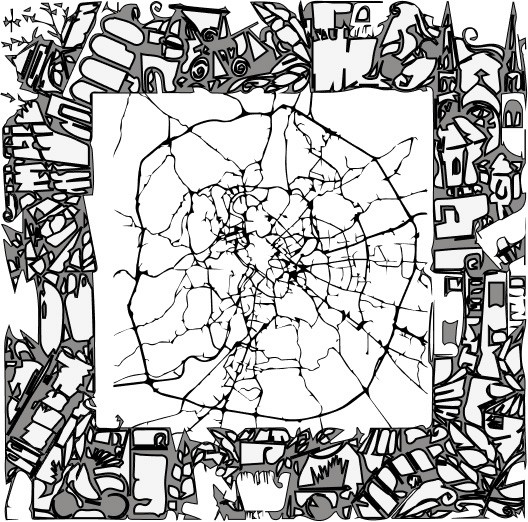
Citydle is a concept for a daily city-guessing game that turns geographic discovery into an interactive experience.
Players work through artistically illustrated cityscapes, deciphering clues from landmarks, cultural motifs, and map fragments to guess the city — with each wrong guess narrowing the possibilities and raising the stakes.
I designed Citydle to explore a question I kept returning to from my architecture background:
"How do you structure a system that guides someone toward a decision using incomplete, layered information, while keeping the experience simple and satisfying rather than overwhelming?"
Over four weeks, I designed the game mechanics, interaction flow, and visual system from the ground up — treating it as a sandbox for product strategy, user motivation, and decision-based interaction design outside the constraints of a live production environment.
This project reflects my broader interest in designing structured systems that shape user behavior without adding friction — the same thinking I bring to any interface where someone needs to make sense of complexity quickly.
Citydle is a concept for a daily city-guessing game that turns geographic discovery into an interactive experience.
Players work through artistically illustrated cityscapes, deciphering clues from landmarks, cultural motifs, and map fragments to guess the city — with each wrong guess narrowing the possibilities and raising the stakes.
I designed Citydle to explore a question I kept returning to from my architecture background:
"How do you structure a system that guides someone toward a decision using incomplete, layered information, while keeping the experience simple and satisfying rather than overwhelming?"
Over four weeks, I designed the game mechanics, interaction flow, and visual system from the ground up — treating it as a sandbox for product strategy, user motivation, and decision-based interaction design outside the constraints of a live production environment.
This project reflects my broader interest in designing structured systems that shape user behavior without adding friction — the same thinking I bring to any interface where someone needs to make sense of complexity quickly.
Project
Overview
Project Overview
Project Overview
How to Play
Think Wordle, but for cities!
Each day, players get one illustrated cityscape and a set of layered clues:
landmarks, cultural motifs, map fragments, revealed progressively as the guesses go on.
Instead of typing a city name, players choose from a set of answer options.
That was a deliberate interaction choice, not a simplification.
Text input introduces spelling variants, transliteration issues, and ambiguity (there are multiple "Springfields" and half a dozen ways to spell some city names) — all of which add friction and misjudge intent rather than knowledge.
A selection-based interaction keeps the cognitive load on recognizing the city, not spelling it, which is the actual skill the game is testing.
How to Play
Think Wordle, but for cities!
Each day, players get one illustrated cityscape and a set of layered clues:
landmarks, cultural motifs, map fragments, revealed progressively as the guesses go on.
Instead of typing a city name, players choose from a set of answer options.
That was a deliberate interaction choice, not a simplification.
Text input introduces spelling variants, transliteration issues, and ambiguity (there are multiple "Springfields" and half a dozen ways to spell some city names) — all of which add friction and misjudge intent rather than knowledge.
A selection-based interaction keeps the cognitive load on recognizing the city, not spelling it, which is the actual skill the game is testing.
Context
Context
Problem Statement
Most geography games I looked at leaned heavily on text input or map-clicking, with little visual richness or narrative texture.
I wanted to explore whether a daily geography game could feel more like discovering a place through art and story than testing trivia recall.
The design challenge was to:
Build clue progression that rewards observation, not just knowledge
Keep interactions simple enough for a 30-second daily habit
Encourage sharing without making the game feel like it's optimizing for virality over curiosity
Target Audience
Primary Users: Casual gamers (ages 10–40) who enjoy trivia and cultural exploration.
Secondary Users: Art enthusiasts, travelers and educators seeking fun learning tools.
Goals
Create an engaging game loop: Users play daily to guess cities based on interactive illustrations and clues.
Foster education through entertainment: Educate users about global cities, their landmarks, and cultures.
Enhance retention: Build features like streaks, achievements, and shareable stats to encourage daily play.
Problem Statement
Most geography games I looked at leaned heavily on text input or map-clicking, with little visual richness or narrative texture.
I wanted to explore whether a daily geography game could feel more like discovering a place through art and story than testing trivia recall.
The design challenge was to:
Build clue progression that rewards observation, not just knowledge
Keep interactions simple enough for a 30-second daily habit
Encourage sharing without making the game feel like it's optimizing for virality over curiosity
Target Audience
Primary Users: Casual gamers (ages 10–40) who enjoy trivia and cultural exploration.
Secondary Users: Art enthusiasts, travelers and educators seeking fun learning tools.
Goals
Create an engaging game loop: Users play daily to guess cities based on interactive illustrations and clues.
Foster education through entertainment: Educate users about global cities, their landmarks, and cultures.
Enhance retention: Build features like streaks, achievements, and shareable stats to encourage daily play.

Design
Process
Design Process
Design Process
City Illustrations
Systematically captured architectural details and textures that conveyed each city's unique aesthetic, from historic structures to urban patterns — drawing directly on a decade of studying how buildings and materials communicate a place's identity. The focus was on documenting patterns, materials, and color schemes as reflections of each city's cultural layers.
Information Architecture
Designed a simple game flow focused on minimizing cognitive load through progressive disclosure — players received one clue at a time rather than everything at once, keeping each guess a genuine decision rather than a puzzle to solve in one pass.
Wireframes
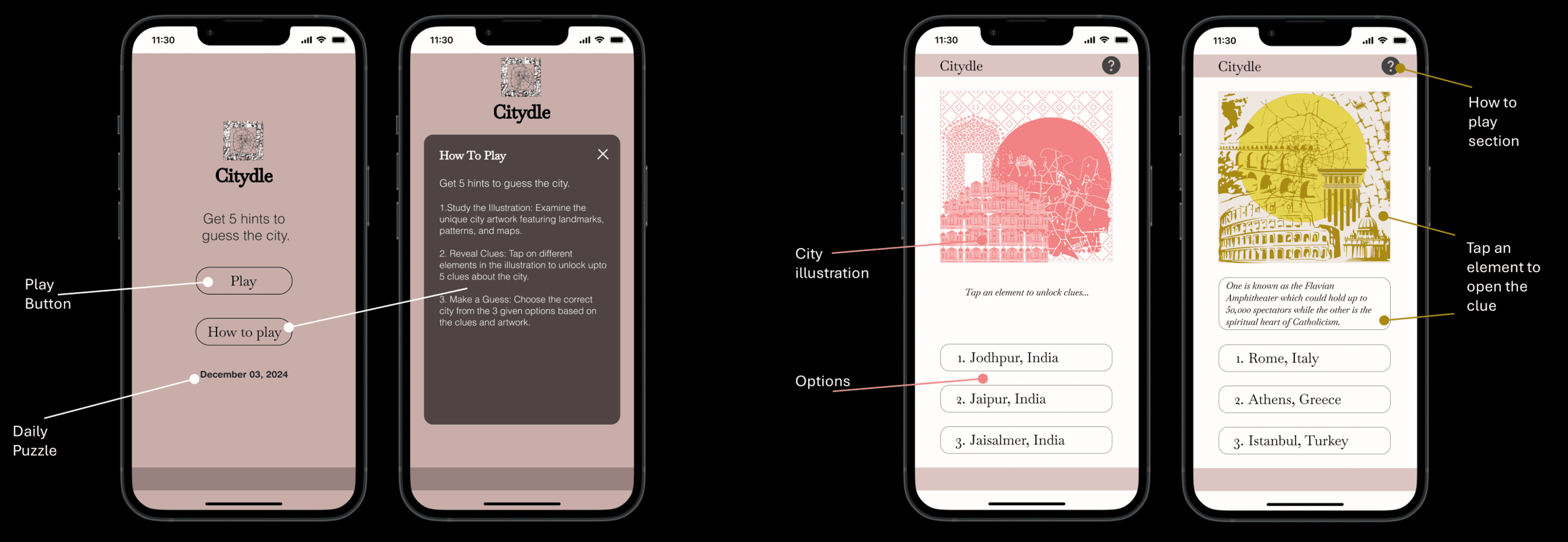
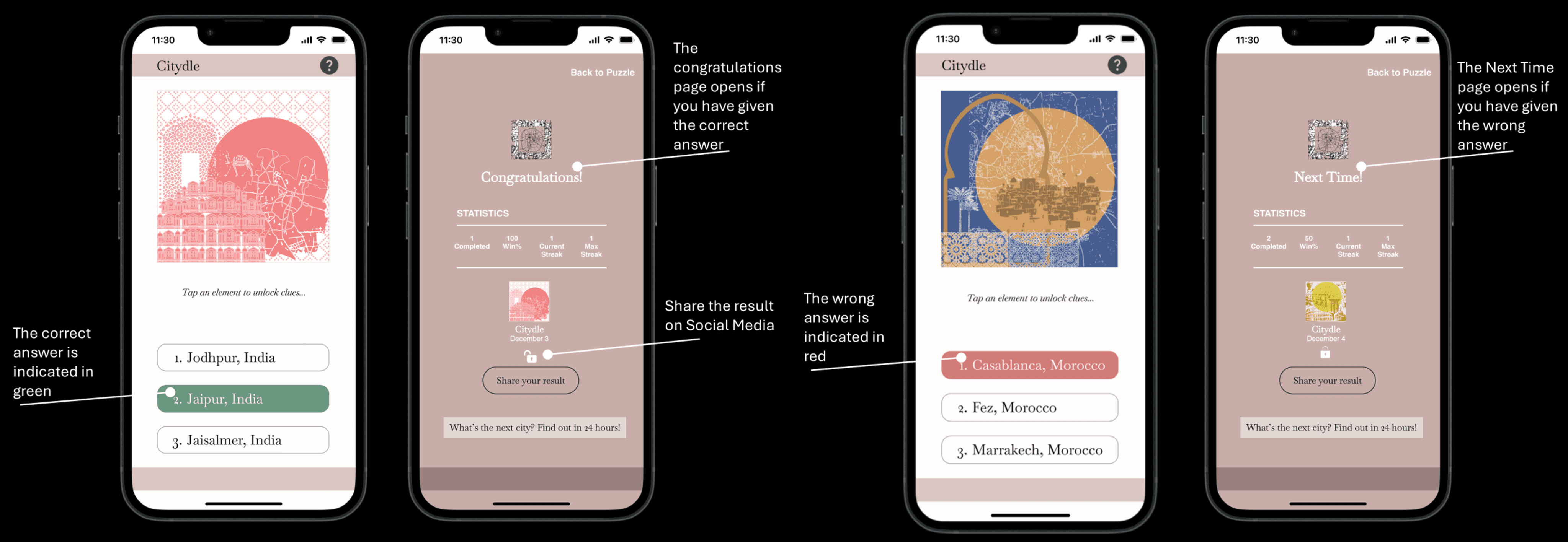
Created low-fidelity wireframes to understand the navigation and gameplay flow and reduce steps for accessing clues and submitting a guess.
Home screen → Daily Puzzle → Interactive Clues → Guessing Screen → Results/Stats.
City Illustrations
Systematically captured architectural details and textures that conveyed each city's unique aesthetic, from historic structures to urban patterns — drawing directly on a decade of studying how buildings and materials communicate a place's identity. The focus was on documenting patterns, materials, and color schemes as reflections of each city's cultural layers.
Information Architecture
Designed a simple game flow focused on minimizing cognitive load through progressive disclosure — players received one clue at a time rather than everything at once, keeping each guess a genuine decision rather than a puzzle to solve in one pass.
Wireframes
Created low-fidelity wireframes to understand the navigation and gameplay flow and reduce steps for accessing clues and submitting a guess.
Home screen → Daily Puzzle → Interactive Clues → Guessing Screen → Results/Stats.
Design
Process
Design Process
Design Process
Visual Design
Warm Neutrals (#C9ADA9 and #FFFDFB): These tones were chosen to evoke an artistic, sophisticated feel that aligns with the city illustrations.
Accent Colors (#85B79D for correct, #D17C78 for incorrect): These colors provide clear, intuitive feedback during gameplay without disrupting the overall aesthetic.
Typography
Old Standard for Name and Headings: its serif design echoes classical print, maps, and educational materials, complementing Citydle's emphasis on exploring the world and its history.
Helvetica for body text: feels familiar and approachable for a global audience. Its neutrality keeps it from competing with the detailed illustrations.
Layout and Spacing
Centered illustrations place the city artwork at the visual center of the experience, since it's the primary source of information for each guess. Generous spacing around elements supports readability and a calmer, more deliberate pace.
Accessibility considerations — dark text on light backgrounds supports readability for low-vision users. Correct/incorrect feedback pairs color with an icon, so the signal doesn't depend on color perception alone.
Visual Design
Warm Neutrals (#C9ADA9 and #FFFDFB): These tones were chosen to evoke an artistic, sophisticated feel that aligns with the city illustrations.
Accent Colors (#85B79D for correct, #D17C78 for incorrect): These colors provide clear, intuitive feedback during gameplay without disrupting the overall aesthetic.
Typography
Old Standard for Name and Headings: its serif design echoes classical print, maps, and educational materials, complementing Citydle's emphasis on exploring the world and its history.
Helvetica for body text: feels familiar and approachable for a global audience. Its neutrality keeps it from competing with the detailed illustrations.
Layout and Spacing
Centered illustrations place the city artwork at the visual center of the experience, since it's the primary source of information for each guess. Generous spacing around elements supports readability and a calmer, more deliberate pace.
Accessibility considerations — dark text on light backgrounds supports readability for low-vision users. Correct/incorrect feedback pairs color with an icon, so the signal doesn't depend on color perception alone.

Outcomes
Outcomes
Citydle was tested informally with a small group spanning ages 11–48 — including my nephew, four friends in their 20s and 30s, and my ASU professor — along with a formal peer presentation to a class of design students.
Concept Reception
The core idea landed consistently across every tester, regardless of age. My 11-year-old nephew and adult testers alike understood the clue-guessing loop immediately and asked to keep playing after the first city — an early signal that the mechanic itself was intuitive without needing an explanation.
Peer & Instructor Review
Presented to a class of 26 design peers and an instructor, Citydle received an average peer score of 4.7/5 and an instructor score of 4.86/5 on clarity, process, and portfolio-readiness. The most consistent praise was for the illustration style and color choices; the most consistent critique was that the interface and visual polish could go further, and that the mechanic for how a new city is selected each day needed clearer explanation.
Citydle was tested informally with a small group spanning ages 11–48 — including my nephew, four friends in their 20s and 30s, and my ASU professor — along with a formal peer presentation to a class of design students.
Concept Reception
The core idea landed consistently across every tester, regardless of age. My 11-year-old nephew and adult testers alike understood the clue-guessing loop immediately and asked to keep playing after the first city — an early signal that the mechanic itself was intuitive without needing an explanation.
Peer & Instructor Review
Presented to a class of 26 design peers and an instructor, Citydle received an average peer score of 4.7/5 and an instructor score of 4.86/5 on clarity, process, and portfolio-readiness. The most consistent praise was for the illustration style and color choices; the most consistent critique was that the interface and visual polish could go further, and that the mechanic for how a new city is selected each day needed clearer explanation.
Citydle was tested informally with a small group spanning ages 11–48 — including my nephew, four friends in their 20s and 30s, and my ASU professor — along with a formal peer presentation to a class of design students.
Concept Reception
The core idea landed consistently across every tester, regardless of age. My 11-year-old nephew and adult testers alike understood the clue-guessing loop immediately and asked to keep playing after the first city — an early signal that the mechanic itself was intuitive without needing an explanation.
Peer & Instructor Review
Presented to a class of 26 design peers and an instructor, Citydle received an average peer score of 4.7/5 and an instructor score of 4.86/5 on clarity, process, and portfolio-readiness. The most consistent praise was for the illustration style and color choices; the most consistent critique was that the interface and visual polish could go further, and that the mechanic for how a new city is selected each day needed clearer explanation.
What I learnt
What I learnt
Testing across such a wide age range — an 11-year-old to adult peers and an instructor — reinforced something from my architecture background: good spatial and visual systems tend to communicate across audiences without needing to be dumbed down or over-explained.
The clue mechanic worked the same way for my nephew as it did for design professionals, which told me the core interaction was sound even before the visual polish caught up to it.
Testing across such a wide age range — an 11-year-old to adult peers and an instructor — reinforced something from my architecture background: good spatial and visual systems tend to communicate across audiences without needing to be dumbed down or over-explained.
The clue mechanic worked the same way for my nephew as it did for design professionals, which told me the core interaction was sound even before the visual polish caught up to it.
Testing across such a wide age range — an 11-year-old to adult peers and an instructor — reinforced something from my architecture background: good spatial and visual systems tend to communicate across audiences without needing to be dumbed down or over-explained.
The clue mechanic worked the same way for my nephew as it did for design professionals, which told me the core interaction was sound even before the visual polish caught up to it.

Going
Forward
Going Forward
Going Forward
That peer feedback shaped my priorities for a next iteration: refining the UI polish beyond the wireframe stage, adding more visual vibrancy to the palette without losing the muted, artistic tone, and designing a visible explanation of the daily city rotation so the mechanic doesn't require guesswork.
Next Project: User Research

Next Project: User Research
Next Project: User Research
SEMTE Graduate Resources Website